
WhatsApp Announced Strict Account Settings: Safeguarding Against Cyber Attacks
Worried about cyber-attacks? 😱 WhatsApp just launched "Strict Account Settings"! It’s a lockdown-style feature that blocks media from unknown senders and silences mystery callers. Extreme protection for journalists, public figures, and privacy nerds! 🛡️🚀🥳 #WhatsApp #Privacy
We’ve all heard those scary stories journalists, activists, or even regular folks getting their phones hacked by sophisticated spyware or rare cyber-attacks. Usually, it starts with a weird message or a call from an unknown number that you didn't even answer. It’s a total nightmare, right? 😱
Well, WhatsApp just dropped a major security update to help you fight back. It’s called Strict Account Settings, and it’s basically a "Lockdown Mode" for your chats. 🥳
What exactly are Strict Account Settings?
As announced on the official Meta Newsroom, this new feature is designed for people who might be targets of highly sophisticated cyber-attacks. 🗞️
Think of it as a protective bubble around your account. When you turn it on, WhatsApp automatically dials your security to the maximum. It's not for everyone it might make the app a bit less "convenient" but for those who need extreme protection, it's a life-saver! 🚀
Why you should care about this?
Cyber-attacks are getting smarter every day. Sometimes, just receiving a malicious file from a stranger is enough to compromise your privacy.
Here is what "Strict Account Settings" actually does for you:
- Blocks Unknown Media: It automatically blocks all attachments and media sent from people who aren't in your contacts. No more accidental downloads of nasty stuff! 🚫📁
- Silences Unknown Callers: Those random international calls? Gone. WhatsApp will silence anyone you don't know, preventing potential "zero-click" exploits. 📞🤫
- Restricts Risky Settings: It locks down other advanced settings that could be used as backdoors by hackers. 🥳
How to turn it on?
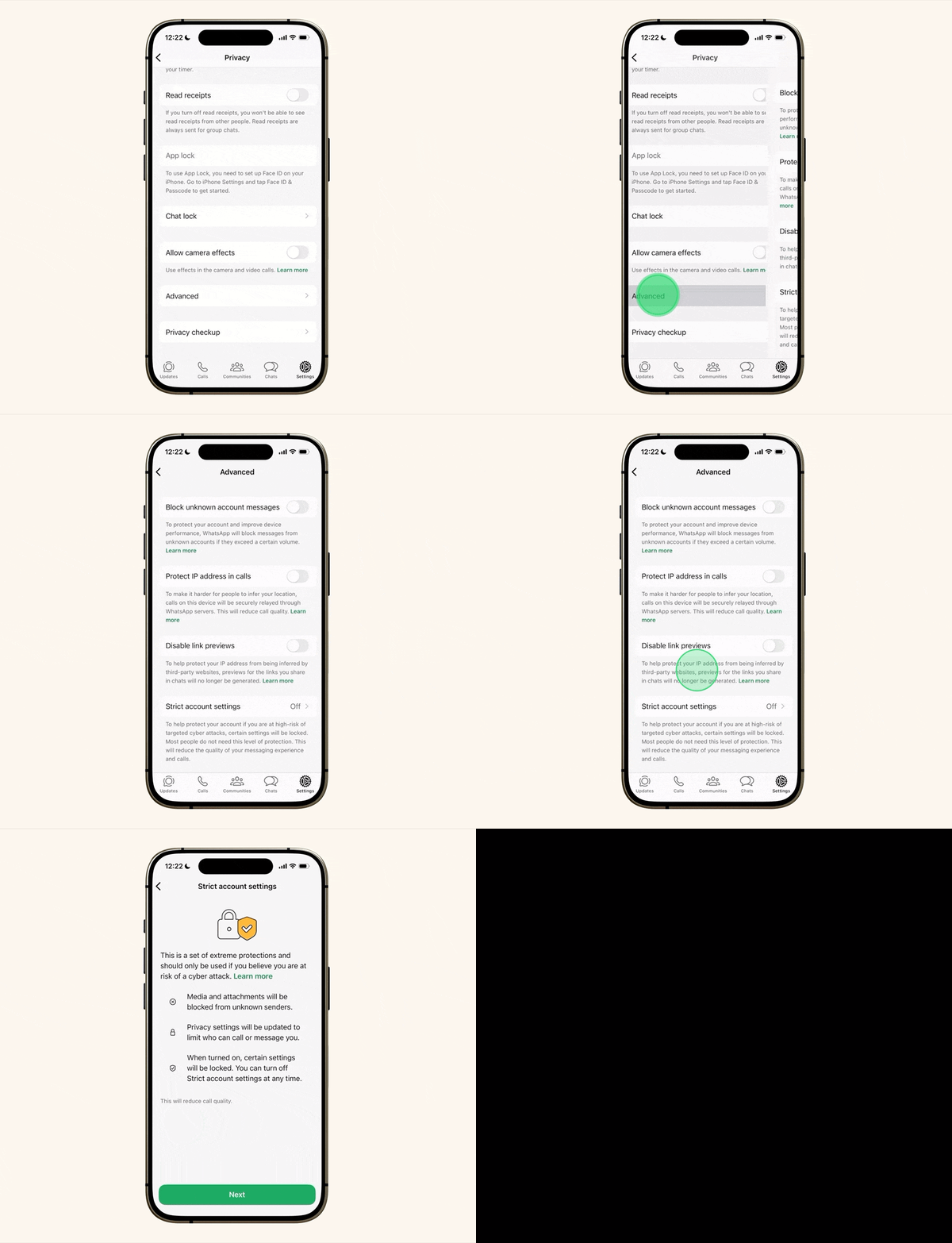
The feature is rolling out globally over the next few weeks. Once you have the update, here is how you find it:
- Open WhatsApp Settings.
- Go to Privacy.
- Tap on Advanced.
- Toggle on "Strict Account Settings." 💻
It’s that simple. Just a few taps and your account is in total lockdown mode. 🥳
The "Lockdown" Trade-off
Keep in mind, that this is called "Strict" for a reason. 🗞️
Because it blocks media and calls from unknown senders, you might miss a legitimate message from someone new (like a client or a distant relative) if they aren't in your contacts yet. But if you’re a journalist or someone handling sensitive info, that’s a trade-off you’ll gladly take for the peace of mind. 🚀
Ready to level up your privacy?
WhatsApp already uses end-to-end encryption by default, but "Strict Account Settings" is that extra layer of armor for those who need it most. 🛡️
Check your settings in the coming weeks and see if it's live for you! 🥳
What do you think? Is "Lockdown Mode" too extreme, or exactly what we need in 2026? Let me know in the comments! 🚀
Wait..
Protecting your digital life is more important than ever. If you found this "simplified" security breakdown helpful, share it with your friends and family. Let's keep everyone safe! 🗞️
Subscribe to our newsletter Get the latest privacy updates and tech simplifications delivered right to your inbox. 🗞️